Showing posts with label software. Show all posts

Monday, 17 November 2014

Some screen shots from the action while making animated characters the past few days

I've uploaded the samples of a few recent simple character animations to YouTube, and wanted to show off some screen shots too, so you know what the Toon Boom interface is like. Some conversations online make it difficult to choose among Toon Boom Studio and products like Flash and Anime Studio Debut. I personally didn't like Anime Studio, and have never used Flash so I can't comment on any comparison yet.

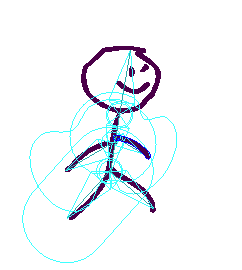
Here's a hint at what working with Toon Boom Studio animation software is like. First, a character with bones and "zones of influence":


A character following a "motion path":


Adjusting with cut-out animation tool:


And some screen shots of the interface while working with my stick figure:
'Zones of influence' for bones are visible; not sure what they do yet!

Leg 'bone' selected and can be rotated about the hip attachment point
Motion path with keyframes along the line spanning 5 seconds, at 12frames/sec

Timeline shows several layers are created to enable motion of each limb
The tricky part of using sophisticated animation software, it seems, is to use the right tool for each task, and select the right layer and timeline position every time, before making an adjustment. One suggestion to Toon Boom already: make icons bigger!!! It's very difficult to tell which view is selected, between Drawing View, Camera View, and the side & top views.

Busy with a variety of artistic media

It's hard to choose some days. I always start with at least two goals for the day, such as finishing a painting and doing a digital painting exercise. Any gigs I get off fiverr.com are done in addition to that, because I have a high drive for learning newer, better techniques than I learned way back in high school and days off during a long period of work and studies.

Last week, I decided to focus a little, however, and I set aside many drawing goals (ie. life drawing studies) so that I could try out some animation, motion graphics, and video compositing techniques I found tutorials for. I ended up downloading an animation software demo that lasts 15 days - Toon Boom Studio.

I've also completed a study in motion graphics that went from basic motion tricks to creating animated logos in Photoshop. I went on just in the past few days, to try to figure out how to add masks to videos, so that people can be highlighted or cropped out for example, even when they are moving around in the frame. Clearly, there's lots to be covered in my bag of interests.

So far a single activity hasn't popped out as 'the one' that I'll prioritize in my personal and commercial pursuits. In the past few days, my animated stick man has gotten more sophisticated, and so has my video masking. Meanwhile, all of those activities require keeping my drawing skills keen. Thus, tonight I set aside most of the computer activities and started a simple watercolour painting exercise using my favourite subject, cats, to try out some quick colour decisions and glazing techniques.

I just wanted to write to keep you interested, and know that I'm not falling off the radar. I have taken a bunch of photos and computer screenshots and need to sit down, organize them, and post them with useful stories about work in progress and my reviews of techniques I've learned recently.

Also, one drawing has been chosen to appear in a group show at Pandora Arts Collective later in November. It's the Forest Kitty ink drawing I previously blogged about. I'm excited about that, and to see the work of my drop-in art group peers on display together.

Happy graphics/video/animation/painting everyone!
Tuesday, 11 November 2014

More stick figures; looking for tutorials to optimize Photoshop animation for 2D characters

I made a few more stick figure animations today, shown below. They were fun, and I'll continue to apply my cartoon-drawing dreams to Photoshop as my preferred animation tool until I can find a good reason to take on an animation software (and all its necessary learning) such as Toon Boom. I also have Blender installed for free 3D animation experiments, so I'm not bored yet.

I would like to be able to do rigging, rather than relying on Photoshop's puppet warp tool for doing character movements. Still, I think puppet warp forces me to really pay attention to gestures and biomechanics (both are personal interests in terms of their related sciences and social sciences), so I'll enjoy the experience.

So far I'm relying on 3D animation literature (old textbooks, and software-specific tutorials) to learn the concepts of keyframes and tweening that I'm using for the stick figure animations. Animated logos are so much easier - Photoshop's tools are designed for manipulating those quite nicely. It's just a little harder when your graphic is a character drawn with the paintbrush tool and a Wacom tablet.

With the tools I've got, I think there's no reason my next animation session couldn't include my cat cartoon characters. After a bunch of that drawing practice, I may want to move into a pro animation software and possibly the 3D side too, perhaps starting with Blender (free).

My choices are open to nudging by clients who may need specific animation and video effects that one software or another excels at. Of course, I'm not just drawing for fun. I want to do animated or semi-animated videos for other peoples' promotions, events, or stories.

Tell me what you think of these ones, and any suggestions you have for a logical next software to try out. Keep in mind I can't afford or justify spending $2,000 or more, for professional versions like Toon Boom or Maya.

Version 2 of stick figure:
And version 3, with more frames and 'tweening':
Ok...I didn't like the ghosty effect in version 3, so I made a version 4 with shorter frame duration and no 'tweens':